
The local service marketplace
Exceptional work. Seamlessly arranged.
Find local trade professionals, compare proposals, and manage every detail of your project—all in one place.
Launching in Halifax, Nova Scotia

How it works
From your first idea to the finishing touch.
A simple process that keeps your whole project in one place.
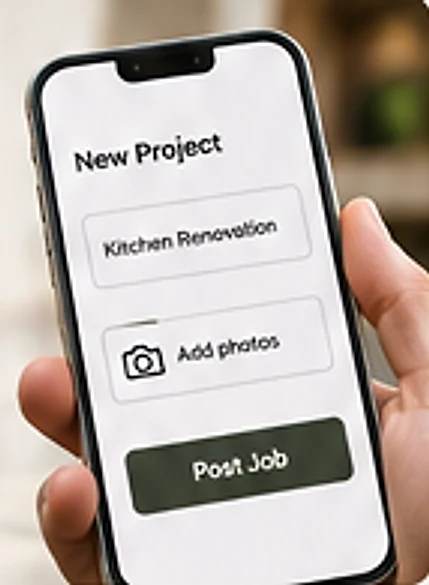
Post your job
Tell us what you need, add photos, and get it out to local professionals.
Receive & review proposals
Get interest from approved Servosa professionals, when available, compare proposals, and agree on the details.

Work, approve & pay
The job gets done, you review the final invoice, approve it, and pay by card—after the work is completed.

Invite-Only Platform
Professionals are staff-approved to join Servosa. We do not verify licences or insurance.You approve the final invoice and pay by card after the work is completed.

For service professionals
Built for the craft. Designed for the business.
Get nearby job requests, handle proposals, scheduling, client communication, and payments—all in one mobile app.
- Nearby job requests
- Simple, on-the-go tools
- Get paid by card

Be part of Halifax’s next-generation service platform
Servosa is invite-only for now.
Request early access as a homeowner or service professional and be among the first to use Servosa in Halifax.
Request an inviteThe whole job, in one place
Each of these is built into the app. A few are new and are still being tested on real phones.
AI-assisted intake
Describe the job in your own words, add up to three photos or dictate it. Servosa’s AI asks a few follow-up questions and drafts a scope. It is a starting point, not a diagnosis.
Nearby pros
Your request goes to approved pros who offer that service within range, in waves.
Compare proposals
Pros send proposals. Compare them side by side and accept in the app with a typed-name signature.
Approve changes
A pro’s change order, a change to scope or price, needs your approval before it is billed.
Scheduling
Pros propose times on a month calendar. You confirm or ask to reschedule.
Messages and photos
Message your pro, share photos and follow job updates in the app.
Safety
For pros: check in and out of a job. An SOS button sends an alert to Servosa staff, then offers a Call 911 button. Nobody watches for alerts around the clock and Servosa is not an emergency service. In an emergency, dial 911 first.
Pay after the work
Nothing is charged up front. You approve the final invoice, then pay by card through Stripe. Servosa never sees your card number.
See both sides of a job
Tap the phone or pick a step. These are sample screens for illustration, with AI-generated photos. Names and prices are not real.
A homeowner posts a job and pays after the work
- RequestThe client describes the job and adds a photo.
- MatchedServosa matches the request with pros nearby.
- ProposalsPros send proposals and the client compares them.
- BookedThe client picks a pro and the job is scheduled.
- PaidThe work is done and the invoice is paid.
The client describes the job and adds a photo.
Sample screens for illustration, with AI-generated photos. Names and prices are not real.
A pro gets a nearby request and runs the job
- Nearby requestA pro sees a request within range.
- Send proposalThe pro sends a proposal.
- ScheduledThe pro proposes a time and the client confirms.
- InvoiceThe pro marks the job complete and sends the invoice.
A pro sees a request within range.
Sample screens for illustration, with AI-generated photos. Names and prices are not real.
How we handle your account
Plain-language practices. The Privacy Policy covers how we handle your data.
- PasswordsPasswords are stored only as salted hashes.
- Wrong-password lockoutRepeated wrong passwords temporarily lock sign-in.
- SessionsSign-in sessions get new credentials each time they refresh. If an old one is replayed, every session on that account is signed out.
- Internal event logServosa keeps an internal append-only log of key account and payment events: the database refuses edits and deletes to it. Customers cannot view it.
- Your dataDelete your account in the app (not while a job or invoice is open). Contact details are erased and invoices are kept anonymised.
Launching in Halifax, by invitation
Servosa is launching in Halifax, Nova Scotia. If your address is outside the area we serve, the app says Servosa is not available there yet.
Servosa is not in the App Store or Google Play yet. We send invites by email.
Servosa holds no SOC 2, ISO 27001, HIPAA or PCI certification.
Built on trusted infrastructure
Questions, answered plainly
What is Servosa?
From the first request to final payment, Servosa connects homeowners with approved professionals and keeps the job in one place.
Where is Servosa available?
We are launching in Halifax, Nova Scotia. If your address is outside the area we serve, the app says Servosa is not available there yet.
How do I get the app?
Servosa is not in the App Store or Google Play yet. Request an invite. We send invites by email.
Do you verify pros?
Not in the sense of checking ID, background, licences or insurance. Servosa staff approve each pro before they can receive requests. Approval requires a confirmed email address and refuses an address outside our service area. Servosa does not verify licences or insurance, so check before you hire.
When am I charged?
Not up front. You are invoiced after the pro marks the job complete. You approve the final invoice, then pay by card through Stripe.
What if something goes wrong?
Message your pro in the app. Servosa is not a party to the work and does not guarantee its quality or insure it. If a paid invoice is wrong, you can dispute it in the app within the dispute window. Servosa reviews it and may refund. Disputes are decided case by case.
How does the AI help?
It asks a few follow-up questions about your job and drafts a scope for the pro. It is a starting point, not a diagnosis. Your description and photos are sent to our AI provider, Anthropic, to do this.
What happens to my data?
We keep what we need to run your jobs and do not sell personal information. You can delete your account in the app. Data is stored and processed in the United States. The Privacy Policy has the detail.
Get in touch
Write, call or send mail to our Halifax address.
Proudly made inNova Scotia
Ready to post a job?
Request an invite and post your first job.